How to identify and report scams
Scams can happen to anyone, and if you've been targeted, you don't have to navigate it alone. If you think your account has been compromised, contact Robinhood Support right away or freeze your account instantly to protect your funds. Our team is ready to help.
Robinhood will never ask for your password, 2FA code, or secret recovery phrase. If someone claiming to be from Robinhood asks for any of these, it's a scam. Contact us directly through the app or at robinhood.com/contact.
Impersonation support scams
These scams are incredibly popular and are often found via search engine results or on social media, sometimes as a promotion.
You should only contact Robinhood Support through the app or on the web at robinhood.com/contact. When you connect to Robinhood Support through chat or email, we’ll NEVER ask you for any account login details. Don't search for or use Robinhood phone numbers found through an internet browser, as they may be fraudulent and part of a scam.
Many phone support scams direct you to call a fake Robinhood customer service number. We offer phone support through an in-app callback request. Don’t use Robinhood phone numbers found through an internet browser as shown below..

Scammers will ask you to:
- Provide or verify personal information, account login details, or two-factor authentication codes
- Transfer money or crypto to them often under the premise of protecting your existing funds
- Download computer software or new mobile apps designed to give them remote access to your computer or screen viewing capabilities
- Go to fake Robinhood login pages (hoping you’ll give them your login information)
ONLY request phone support from Robinhood through the app or by visiting robinhood.com/contact.
Robinhood Support will never:
- Ask you for your Robinhood account password
- Request you to download remote desktop access software or ask you to share your screen
- Ask you for your account information or credentials for other trading platforms
- Ask you to add unfamiliar account information to your account (e.g. an email address you don't own)
- Send you links within text messages
- Ask you to create a Robinhood account, including a Robinhood Wallet account
- Ask you to send money or crypto through Robinhood or other apps (CashApp, Venmo, etc.) – never send money or crypto to anyone claiming to be from Robinhood
A social media account can impersonate Robinhood or an executive team member promising a payout, a promotion, or special support if you send them something in return.
Only engage with our authentic Robinhood social media handles. If someone is reposting a screenshot of what appears to be a Robinhood post, you can always go directly to our authentic handle to confirm whether the original post is legitimate or not. Don't engage with non-Robinhood handles promising you special help with your account.
A pump and dump scam is a form of market manipulation where scammers encourage you to buy specific stocks or crypto, often low-volume, low-market cap stocks. As more investors buy in, this increases the stock price (the pump), allowing scammers to then collectively sell their shares for a profit. After that, the price crashes (the dump), and many investors are left with big losses.
We’ve seen an increase in this type of scam where scammers pose as financial professionals or community members and spread the false hype through a number of channels, including social media platforms, online forums, and group chats. For example, a scammer reaches out to you through X or adds you to a WhatsApp group offering you investment advice or stock tips.
Pump and dump scams may pressure you to act quickly, so it’s important to take a step back and make decisions based on your own research and goals. In any non-managed Robinhood account, the decision to buy or sell always rests with you.
Be skeptical about unsolicited advice, especially from unverified sources. Before taking any action, verify any firm or financial advisor.
If something feels off or too good to be true, be vigilant. You can always contact us for assistance.
Social media scams
Look out for off platform communications from investment groups using apps such as: WhatsApp, Discord, Telegram, or any other social media platforms.
These scammers may impersonate legitimate crypto platforms, influencers, or celebrities to gain your trust. They may also use fake testimonials and success stories to manipulate you into believing the investment opportunity is legitimate.
They may lure you in with promises of quick and/or high returns, and use persuasive tactics to convince you to invest money. There may be a sense of urgency insisting the opportunity is limited or prices will increase.
Once funds have been sent the scammer may disappear or block you without any way to recover the funds.
- Randomly added to investment groups
- High ranking executives at major financial institutions participating and providing “trading advice”
- Emojis and numbers in the titles of the trading groups
- Non-US phone numbers from members in the group
Phishing
Phishing is a common way scammers try to trick you into giving them personal information such as an account email address and password, verification codes, Social Security number, bank account credentials, or other personal information. Scammers may send fake texts or emails that look like they’re from Robinhood. Never click suspicious links or call phone numbers sent to you by text or email. Always access Robinhood directly through the app or website.
Other social engineering attempts leverage fake websites, text messages, social media messages and profiles, phone calls, or postal letters pretending to be from Robinhood. When successful, these scammers can gain access to important accounts, such as your email or bank accounts that can result in identity theft, financial loss, or both.
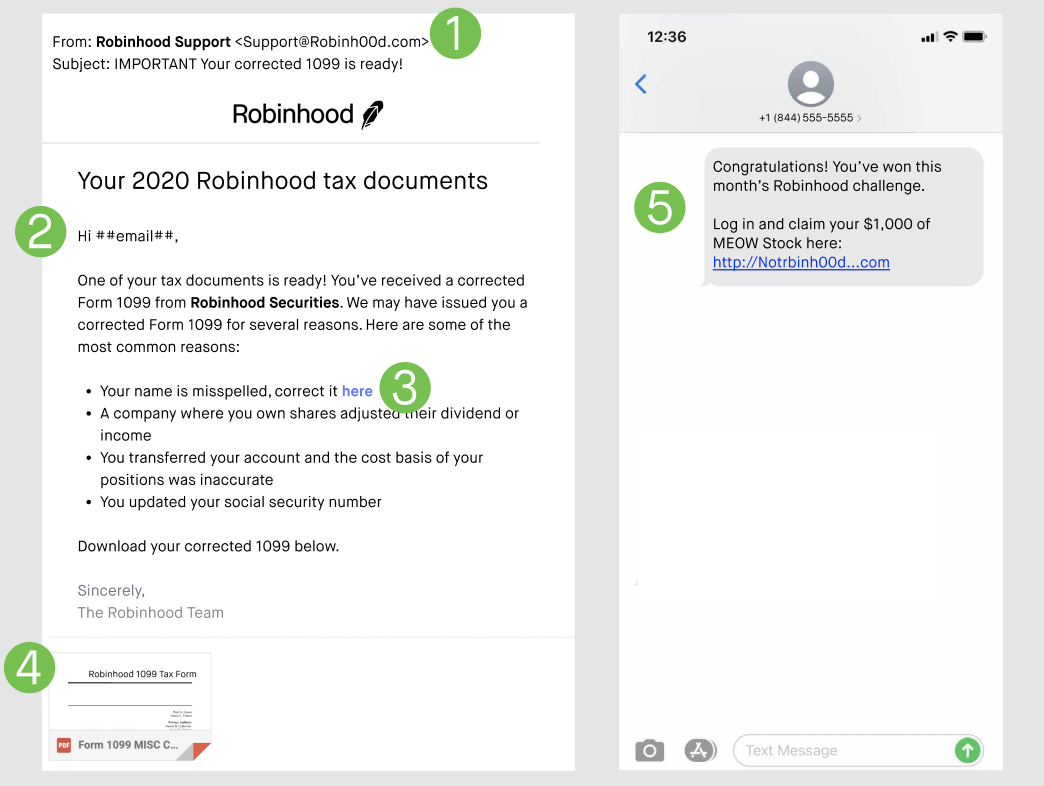
- The sender’s email domain (the web address that comes after the @ symbol): While the sender name might include “Robinhood,” the email domain must be an authentic Robinhood domain.
- Authentic domain examples: @robinhood.com
- Shareholder-specific communication: @proxydocs.com, @proxypush.com, @prospectusdocs.com, @saytechnologies.com
- Fraudulent domain examples: @robinh00d.com, @gmail.com, and @yahoo.com.
- Language and content: Look out for typos, grammatical mistakes, awkward language, or missing words or spaces. Also, be cautious of situations that introduce urgency and fear by using emotionally intense language paired with time-sensitive consequences. For example, “respond immediately or your account will be suspended.”
- Links, buttons, or phone numbers: Instead of selecting links or buttons or calling phone numbers within emails, log in to the Robinhood app or Robinhood.com directly. Links in phishing emails could direct you to a fake website asking for sensitive information such as your email address and password, account information, or Social Security number.
- Downloads or attachments: Phishing emails may include attachments claiming to be a 1099 tax document or other important files. These frequently contain malware that can infect your device. Be especially wary of .zip, .exe, or .doc files.
- Fake prizes or gifts: Scammers may also contact you with attractive offers for free stock or other enticing deals to lure you in. Always be careful when clicking on links in social media messages, text messages, and emails that you don’t expect or recognize—especially if they sound too good to be true. On social media, Robinhood will only share updates and general information using our verified Robinhood social media handles.
- Only request phone or chat support from Robinhood through the app or at robinhood.com/contact.
- Only download and use the authentic Robinhood app available in the Google Play store and Apple App Store.
- From your computer, only sign in through Robinhood.com to access your account and download items, like your tax forms.
Secure your personal email and phone provider
When you request a password reset link for a site, where does that link typically go? Your personal email. Use a strong, unique password (10+ characters) on your personal email associated with your Robinhood account to stay safe.
We recommend doing the same with your online account for your phone provider. This helps protect against SIM swapping, when a scammer bribes or convinces the phone carrier to switch the phone number associated with your device to theirs.
Crypto scams
Crypto scams are becoming increasingly common. Crypto transfers can’t be reversed or undone, and Robinhood can’t reimburse you for crypto transfers that you authorize. You must keep your password secure and only send crypto to trusted crypto wallets.
Crypto scams present in various forms, however these are some of the most common:
- Transfer scams: Transferring your tokens or NFTs to a scammer, either with the expectation of receiving something in return, or under the guise of false trust. This includes romance scams where scammers attempt to gain your trust after meeting you on a dating site or social media, only to persuade you to give up your crypto.
- Phishing scams: Interacting with fake marketplaces, social media accounts, giveaway offers, and unsolicited airdropped NFTs that contain phishing links designed to gather your personal information or sensitive wallet information (e.g. secret recovery phrase), or that are embedded with malicious smart contracts designed to give the scammer access to your tokens, NFTs, or entire wallet.
- Pump and dump scams: Where scammers rapidly and artificially inflate the price of a token or NFT and then sell it to you when the value is high, leaving you stuck with a token or NFT that has little-to-no real value.
- Rug pull scams: Where scammers attract investors, but then abandon the project and disappear with project funds.
- Counterfeit NFTs: These NFTs look like authentic and oftentimes popular NFTs, but in reality are fake, hold no actual value, and are designed solely to steal your crypto.
- Celebrity and event impersonation scams: Scammers may use fake videos or social media posts featuring public figures or major events to promote crypto giveaways or “investment opportunities.” If anyone asks you to send crypto to receive more in return, it’s a scam.
- Never share your secret recovery phrase with anyone: Robinhood will never ask you for your secret recovery phrase. Only enter your recovery phase when you are recovering your wallet in the Robinhood Wallet app.
- Be wary of suspicious phishing, social engineering, and scam attempts: This includes airdrops, emails, text messages, social media messages, and fraudulent websites that ask for your personal information, contain unexpected NFTs, offer financial advice, etc. When in doubt, verify the authenticity of any request before taking action.
- Before signing a transaction with your wallet, make sure to check the transaction details: It’s possible for scammers to access your funds if you sign a transaction, so only approve transactions if you trust the sender and confirm the transaction is the one you intend to make.
- Only transact with entities and individuals that you know and trust: This includes connecting to dapps, interacting with NFTs, sending and receiving NFTs, and so on. Exercise caution while forming online relationships. Beware of promises of “low investments and huge returns.” If it’s too good to be true, it probably is. Also, if someone you’ve recently met offers you financial advice, get a second opinion from someone you know and trust. Especially before you send money, crypto, or NFTs to an unknown account or person.
- Do your research: This means investing your digital assets in well-known and credit-worthy platforms. If it’s a familiar crypto company they’re referencing, type the URL yourself and do your own research instead of trusting their link. As it relates to NFTs, make sure to review the transaction history of an NFT before interacting with it, cross-check NFT prices, and review the collection information.
Payment scams
Payment scams are all too common, and a scammer’s tactics to steal your money and assets are always changing. Robinhood is not liable for any payments made in connection with a third party scam or if you make a mistake in providing payment information to third parties.To avoid scams, make sure that you only interact with people you know and trust and carefully review all information before sending a payment.
Here are some of the most common payment scams:
- Impersonation scams: Impersonation scams are when a scammer pretends to be someone you trust to convince you to send them money. They can begin with a phone call, text message, or email from a trusted business, a well known celebrity/political figure, or someone you know, such as a friend or family member. The most common types of impersonation scams include: tech support scams, celebrity impersonation, and family emergency scams.
- Charity scams: Charity fraud schemes usually seek donations for organisations that don’t exist or that don’t support the causes mentioned, or involve fraudulently claiming affiliation with a legitimate charity. These scams typically increase around the holiday season or when natural disasters occur. Tragedies are often used to exploit people who want to help and donate to charitable causes.
- Debt collection or relief scams: Scammers will often pose as debt collectors on a debt that’s already been paid or a debt someone doesn’t actually owe. Some scams may target families or survivors of deceased relatives posing as debt collectors.
- Romance scams: These typically involve a scammer who pretends to have a romantic interest in a target, establishes a relationship, and then attempts to get money or sensitive information from the target under false pretences.
- Employment scams: Scammers posing as recruiters will direct individuals to establish accounts at Robinhood and receive funds from typically stolen bank accounts or other illicit activity. The individuals are then instructed to withdraw portions of the money to various sources while keeping some for commission or compensation.
- Investment scams: These are those “low investments and huge returns” scenarios, where people are tricked into investing money with promises of high returns, without financial risk.
- Lottery and sweepstakes scams: Scammers will often inform you that you’ve won a prize through a lottery or sweepstakes, and require you to pay an upfront fee to recover the prize.
- Text message scams: Don’t tap on links or share info from unexpected texts Always verify through the app.
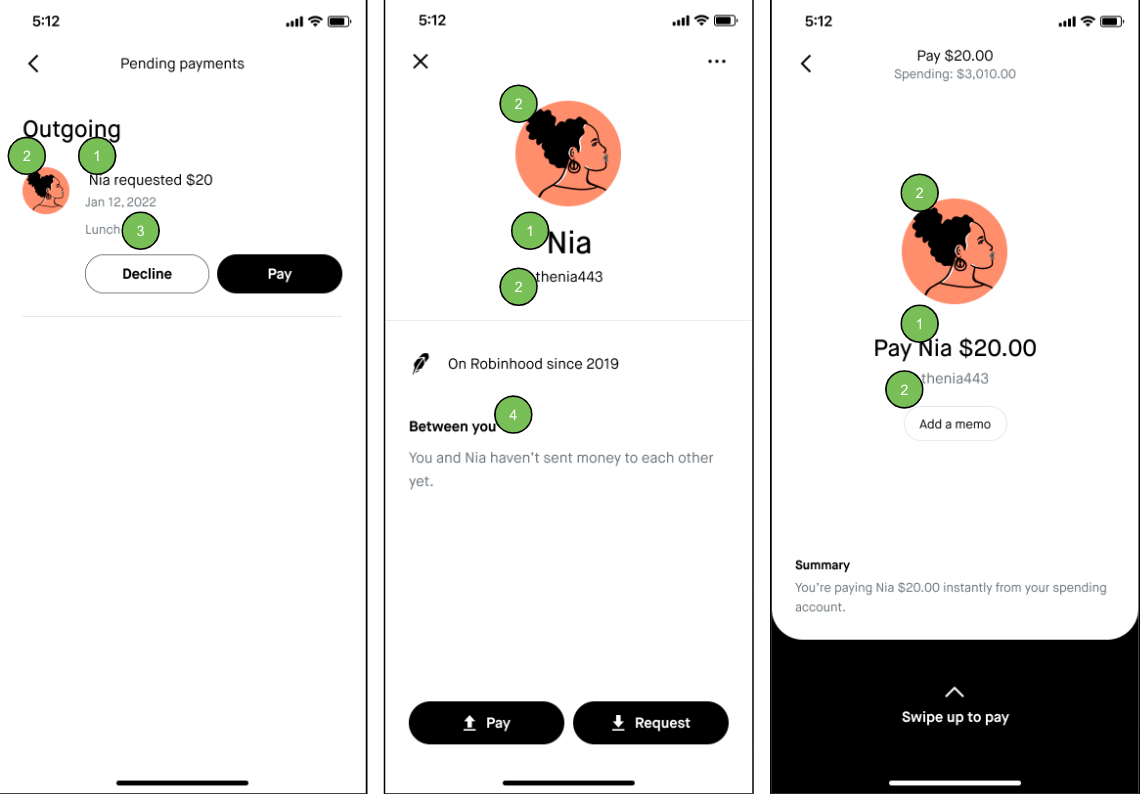
- Legal name: We’ll only display the legal name associated with the Robinhood account you are interacting with. Make sure this legal name matches who you intend to pay. If it doesn’t, don’t complete the payment.
- Profile photo and username: Robinhood doesn’t verify the accuracy of profile photos or usernames. While these could be indicators that you are truly interacting with your friend, family member, or other intended recipient, it’s always a good idea to verify the source (i.e. call your friend) when you receive a payment request you aren’t expecting.
- Text memo: Look out for typos, grammatical mistakes, awkward language, or missing words or spaces. Use of urgency and fear by using emotionally intense language paired with time-sensitive consequences. For example, “pay immediately or your account will be suspended.”
- Previous transactions: If you’ve paid someone before, but you aren’t seeing a history of transactions on the profile that appears to be that person, make sure you verify the source (i.e. call your friend) before paying.
- Only interact with people you know and trust: Scammers are common, but also sophisticated. Make sure that you only send money to people you know and trust. Never make a payment to someone you don’t know.
- Verify the source of the request: When in doubt, you should always verify the origin of a payment request, especially if there is urgency, there are threats involved, or you receive the request from an unfamiliar email, phone, number, or communication channel. Call a trusted friend or family member. When a company is involved, use their official customer service channels.
- Resist the pressure, sense of urgency, and threats: Payment scams often introduce a sense of urgency, pressure, or threats to trigger your emotions. Take a breath, and make sure you fully understand the circumstances around the request before you take action.
- Do your research and ask questions: If someone approaches you with an investment opportunity, sweepstakes winnings, or a debt owed, be sure to research the company involved and ask lots of questions to fully inform your decision. If it sounds too good to be true, it probably is.
- Never provide financial or personal information: Never provide your financial or personal information, or account login details.
- Always go direct: Only contact Robinhood through the app or website—do not search for support numbers online or call numbers sent by text or email.
Take action and report
If you believe your account has been compromised, contact Robinhood Support immediately to freeze your account. If you don’t have access to your account, email us at support@robinhood.com for help. Remember, Robinhood will never ask you for your login info or your secret recovery phrase for your Robinhood Wallet.
If you'd like to report phishing scams in email, text messages, phone calls, websites, or social media, or while interacting with Robinhood Wallet, report them to reportphishing@robinhood.com. Only use this email address to report suspected phishing scams. You won't receive a response from our team.
Help us investigate with the right information:
- Email: Include full email headers. Check out How to Get Email Headers
- Text message: Screenshot the message and include the number that contacted you
- Phone call: Include the phone number from the call and share as much detail as possible
- Website or social media account: Send the full URL or handle and how you found it (such as through a search or a direct message)
- Robinhood Wallet: Include the full wallet address, or screenshot of a scam NFT
Remember, Robinhood will never ask you for your login info, 2FA code, or your secret recovery phrase for your Robinhood Wallet.
Reporting suspected scams helps Robinhood identify and take down these sites and thwart attacks—your report can help protect your account and others too.
If you shared your Robinhood credentials with anyone else, used the same password for a different online account, or are concerned about your account’s security, do the following as soon as possible.
- Remove unknown devices: Review and remove any devices you don’t recognize or no longer use.
- Change your password immediately: A strong password contains at least 10 characters, includes uppercase and lowercase letters, numbers, and symbols—and is one you don’t use for any other app or service or share with anyone.
Verify your identity
Device approval notifications only go to a trusted Robinhood device. If you changed or lost that device, you can still verify your identity in other ways such as:
- SMS one-time-code
- Bank verification
- A three-point selfie
- A photo of the front and back of a valid government ID
Contact Robinhood Support immediately and freeze your account if you notice any unusual logins or activity you don’t recognize.
For more tips on how to help keep your account secure, review Security best practices.
FAQs
Will Robinhood ever ask for my password? No. Robinhood will never ask for your password, 2FA code, or secret recovery phrase—through any channel. This includes phone calls, emails, text messages, and chat. If anyone claiming to be from Robinhood asks for this information, end the conversation and contact us directly.
Is this email, text, or call really from Robinhood? Legitimate Robinhood emails come from @robinhood.com addresses only. If you're unsure whether a message is real, go directly to the app or robinhood.com/contact to verify. Don’t click links or call numbers from the message itself. Review How to identify and report scams for more helpful tips.
I already sent money to a scammer. What should I do? If you believe you've been scammed, contact Robinhood Support as soon as possible. Acting quickly gives us the best chance to help. You should also report the scam to the FTC at reportfraud.ftc.gov.
Can I get my money back if I was scammed? It depends on how the funds were sent. If you authorized a transfer or payment yourself, we may not be able to reverse it. Crypto transfers, in particular, can't be reversed or undone.
How do I freeze my account? If you think your account has been compromised, contact us through chat in the app. Describe what you're experiencing and use phrases like "my account is hacked" or "there's unauthorized activity on my account." The chatbot will show a Freeze account button. Select Yes, freeze my account to confirm. Freezing your account stops all deposits, withdrawals, and new positions until our team completes a review which can take 1-2 weeks. You can still sell assets you already hold.
My account is frozen or under review. What does this mean? If your account has been locked, it means our team has flagged unusual activity and is investigating to protect your funds. This can happen automatically or after you request a freeze. You won't be able to deposit, withdraw, or open new positions until the review is complete, which takes 1-2 weeks. You can still sell assets you already hold or close existing positions.
When will my account be unlocked? Your account will be unlocked after the review is complete and any required identity verification steps are finished. Timelines vary based on case complexity. Our team will notify you by email when the review is done.
Learn more
Disclosures
By opening a third-party URL or hyperlink, you’ll be accessing a third-party website. No monitoring is being performed of the information contained on the third-party website. Robinhood Markets, Inc. and its affiliates are not responsible for the information contained on the third-party website or your use of or inability to use such site and do not guarantee its accuracy or completeness.